 1800 Green Hills Road
 Av Adolfo López Mateos Nte 95
2021's Best Practices for NetSuite Payments

As the ERP of choice for over 27,000 organizations worldwide, NetSuite isn’t going away anytime soon. And, if you’re reading this article, then you're probably one of those thousands of accounting professionals that trust Oracle’s tried and tested software.
But, just because something is popular and comprehensive doesn't mean it can’t be further optimized.
In fact, most businesses do end up customizing their NetSuite ERP, with 37% of professionals opting for significant customization. That’s because, for AR departments in 2021, they need more support than ever when it comes to taking on the challenges that will be faced by finance organizations during this next decade.
The fact is, most financial professionals don’t get to flex their skills because they have to waste time with manual data entry or follow up on late payments. In the US, 11% of invoices aren’t seen by customers and 39% are paid late.
At the same time, paper invoices are costly. An error-free invoice can cost up to $30 to process. So, it’s no surprise that more AR departments are investigating how to speed up the AR process and encourage faster customer payments.
That’s where optimizing NetSuite comes in.
Why should you optimize your NetSuite processes?
Honestly, this article would be too long to read if we listed every single reason you should be optimizing your AR processes in NetSuite. So, we'll stick with the most important factors.
You already know that NetSuite is a powerful platform. But key customizations, such as AR automation and enhanced analytics, can turn your department into a revenue engine. Here are some key benefits that come along with upgrading your NetSuite with simplified processes or a robust integration:
- You'll save money. According to Ardent, automated invoices only cost $2.25 a piece.
- In fact, automated invoices typically pay for themselves within 18 months.
- Automated invoicing alone cuts the payment time cycle by 80%.
- Enhanced, real-time analytics provide insight for a better strategy.
And that’s just the technology aspect. In this guide, we’ll also go over some additional NetSuite account hacks so you can save even more time.
Best practices for NetSuite payments in 2021
There are really two parts to optimizing your NetSuite payments. The first is to add essential integrations to streamline your workflow. Meanwhile, the second revolves more around mindset and strategy.
1) Simplify the AR workflow
When it comes to your AR workflow, you need to cut the bloat. When working with a tool as thorough as Netsuite, combined with legacy processes, there’s bound to be room for some upgrades.
To get started, you’ll want to ask yourself about the core AR workflow and consider alternatives:
What payment types does the department accept?
First, review what payments you’re accepting in the first place. If you’re relying on old-fashioned checks, that should probably be the first thing to go. Most businesses are now accustomed not only to digital payments, but even using their mobile device to send a payment.
There are several inefficiencies that come with accepting checks, even if you’re using a lockbox. Checks are impossible to automate in your invoice processing workflow. At the same time, they take days, if not weeks, to send and receive. Then, when you finally get the check payment information, you need to manually record the payment in your NetSuite account.
If you only have the chance to make one change in the year, we recommend nixing checks from your workflow and shifting to digital payments only, whether that’s bank-to-bank transfers, ACH, credit cards, or eChecks. For your customers’ convenience, you can even offer all these options in the same invoice.
How do I accept payments from within NetSuite?
The best and most efficient way to accept payments is to offer a real-time payment option. Without integration, this can be difficult to do with custom invoices.
For example, you can include a link to your payment portal in all invoices. But the link will be generic, and it will be up to the customer to verify the amount due. Otherwise, you would need to manually add links for each customer. That just doesn't make sense.
And while NetSuite does allow you to add different payment methods, you must choose exactly which payment method is required for each invoice. So, not only are you limited in what payment methods you can offer, but you can’t encourage specific payment methods. For example, you will have to eat the card payment processor fees for bill payments made with credit cards, rather than disincentivize them with convenience fees.
When looking at your workflow, you should ideally just have to hit “send” to your payee and be able to track whether or not the invoice has been opened and paid.
2) Limit access and establish controls
The best way to prevent errors or even expense fraud is to limit who has access to certain features on NetSuite. Allowing anyone in the department to edit all quotes within the system will, at the minimum, make project management difficult.
For most NetSuite users in your accounting department, it's beneficial to offer some restrictions – such as assigning a certain team to a subsidiary or only allowing users to edit their own files and vendor records. You can also restrict view permissions if necessary.
What controls you end up using depend entirely on your department size and needs.
3) Make good use of technology and automate
We’ve mentioned this before, but automation is a clearcut way to achieve fulfill purchase orders, fast. But automation doesn’t just apply to your workflow.
For example, once your customers decide to pay, let’s say, with ACH, they can save their payment details. They can even pay partial or multiple invoices at one time.
At the end of the day, payment automation is also about customer service. So, if and when you decide to add an automation component, consider the end-user interface for optimal results.
4) Renegotiate payment terms
Outside of the technology spectrum, consider renegotiating payment terms with customers. Having a “pay now” functionality gives your customers more flexibility, but you may want to shorten payment times, too.
If you’ve noticed that some users are paying late and you’re already on a 45-day payment period, consider shortening your payment period to 15 days. Your customers still might be late, but you may end up getting paid in 30 days instead of 50.
While payment terms are contingent on your customer’s available working capital, it’s worth experimenting with payment deadlines to see if you can keep the cash flow coming.
5) Go paperless
Given that it’s a digital platform, NetSuite does offer you the chance to go paperless. Automation can further reduce the amount of paper you use, especially if you decide to switch from paper checks to digital payments as we suggested.
The fact is, processing paper documents takes more time, and you still have to buy the paper. With today’s technology, such as being able to securely scan documentation with mobile apps and send them in real-time, there’s really no reason for outdated technology to weigh you down in the office.
6) Check for duplicate payments
You can detect duplicate transactions on NetSuite, although you will have to search it manually. The actual process is simple, but it can take some time:
- Go to Setup
- Select Company, then Duplicate Detection
- Check the boxes for both “vendor” and “customer duplicate detection”
- Add the fields you want to review for duplication by clicking on the arrow to the side
- A list of potential categories should pop up; choose what you want to search for
- Click Done
- Click Save
Now, when you attempt to make a record with the same name or details, you will receive a warning during the creation process.
But this doesn’t help with preventing duplicate transactions. This often happens if auto-numbering and “Allow Override” are both turned on, which is a common pitfall post-NetSuite configuration.
This is another area automation implementations can help with since you would receive notifications if a duplication occurred.
7) Review data on a regular basis
Ideally, you’ll want to review reports on a weekly or monthly basis. Creating and reviewing the Chart of Accounts in NetSuite still plays a vital role. But, you’ll probably also want to add your KPIs to your dashboard for quick daily summaries.
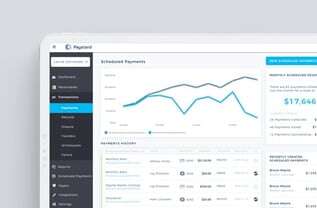
Certain integrations can provide further insight and intelligence. To give you an idea, Paystand provides a rich dashboard where you can review the following:
- Processing volume
- Subscription payments
- Customer payment method data
- Real-time transaction status
- Track and get data on disputes, refunds, and reconciliations
The more data you have, the better you can plan for different scenarios that may affect your cash flow in the long term.
8) Plan for compliance
However you choose to use NetSuite, planning for compliance is critical to staying ahead of the regulation curve. One of the ways you can do that is by touching as little sensitive data as possible.
This is true whether you choose to use NetSuite by itself or opt into using a few integrations.
At Paystand, we use tokenization to provide a secure environment where you can authorize, charge, and re-use a customers’ payment method without accessing their private information directly. This is because we replace sensitive customer data with randomized tokens.
Take a more strategic approach to AR management
When it comes to optimizing NetSuite for the next decade, it’s clear that SuiteApps are the future. Flexible integrations can allow you to automate just about anything, from B2B payments to e-commerce portals.
For NetSuite customers looking to streamline their AR processes, they need a platform that supports their expertise, reduces costs, increases revenue, and is easy to use for both employees and end-customers.
At Paystand, we’re so much more than just a simple interface (although our platform is amazingly easy to use). To learn more about how we can help you accelerate your NetSuite workflow, book a demo with us today.